
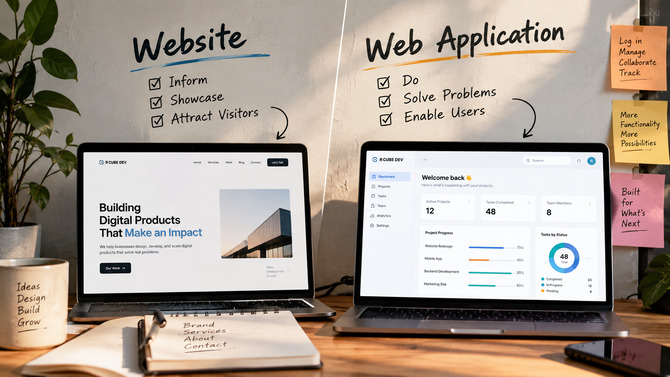
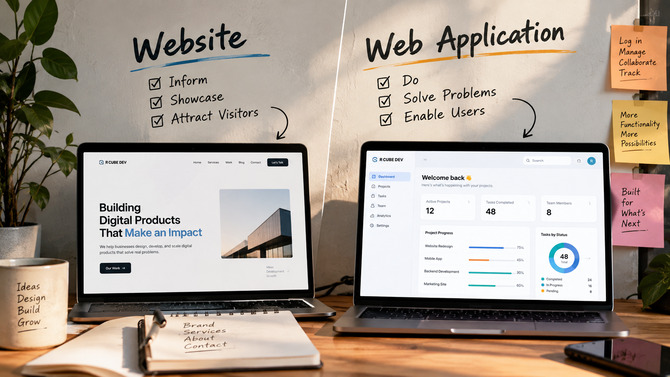
A shop owner in Kolkata once told us she'd paid for "a website" — a real one, done properly, by a decent local developer. Six months in, she came back with a list. She wanted customers to create accounts. She wanted to see who'd bought what, and when. She wanted a dashboard for herself, not just a page for her customers. She wanted the site to remember people.
None of that was in the original scope. Not because the developer did a bad job — the site looked good, loaded fast, had all her products listed. But she hadn't asked for a website that could do those things, because she didn't know there was a difference between "a website" and something that could hold onto information about a person and act on it later. Nobody tells you that at the point of sale.
That gap — between what people ask for and what they actually need — is where a lot of rebuild budgets quietly disappear. It's not a rare story either. We hear some version of it often enough that it stopped surprising us a while ago: a business grows past its first site faster than anyone expected, and the growth itself is what exposes the gap. The website did exactly what it was asked to do. It just wasn't asked to do the right thing.
So before you brief anyone, developer or agency, it's worth fifteen minutes to understand what you're actually choosing between. Not the marketing version of the distinction — the practical one, the kind that changes what a quote looks like and how long a build takes.
Why Nobody Warns You About This
Here's the honest reason this confusion is so common: it isn't really your fault, and it isn't really a knowledge gap you should feel bad about. The line between a website and a web application used to be obvious. Now it isn't, because almost every website has some interactive piece bolted onto it — a contact form, a live chat widget, a newsletter signup, maybe a calendar for booking a call. All of that feels dynamic. All of that feels like "the site is doing something."
But doing something and remembering something are not the same thing.
A contact form that emails you when someone fills it out is a website with a feature. It doesn't know who you are. It doesn't store your submission anywhere you can log in and review later, tied to an account, alongside your last five submissions. It fires once and forgets you existed. That's fine — most businesses need exactly that and nothing more.
Nobody asks for a "web application." They ask for a website, and then they ask why the website can't do the ten things they actually needed.
A form is a formality. An application has a memory. Once you hold onto that one distinction, most of the confusion in this space evaporates.
What Actually Makes Something a Website
Forget the technical definitions for a second — forget HTML, forget "static vs. dynamic," forget whatever a vendor told you to make the decision sound more complicated than it is. Here's the only test that matters: if two different people visit at the same moment, do they see the same thing?
A restaurant's menu page. A law firm's "About Us." A boutique's product catalog. A portfolio site for a photographer. In every one of these, visitor A and visitor B get an identical experience. The content might update — someone on the team edits a price, swaps a photo, adds a new case study — but that update comes from an editor working in a CMS, not from the visitor's own actions. The visitor is reading. They are not changing anything about what the next person sees.
This is true even when the site feels sophisticated. A restaurant site with an embedded reservation widget from a third-party tool is still, fundamentally, a website — the booking logic lives somewhere else, and the site itself is just displaying content and linking out. R Cube Dev's own Services page works this way: everyone who lands on it sees the same fourteen services in the same three groups, regardless of who they are or when they last visited.
If two people visiting at the same moment see the exact same thing, you're looking at a website — no matter how much JavaScript is running under the hood.
This is also, not coincidentally, where most of the confusion around "web design vs. web development" comes from. Web design is the visual and structural work of that shared experience — the layout, the typography, the way the menu flows. Web development is building the thing that delivers it. Both roles exist entirely within website territory for the vast majority of business sites, which is part of why the two terms get used almost interchangeably in casual conversation. They're closely related jobs solving a closely related problem — but neither one, by itself, is what creates a web application.
What Actually Makes Something a Web Application
Now flip the test. A web application is anything where the experience depends on who's asking, what they've done before, or data that belongs specifically to them.
Log into a project management tool and you see your tasks, not a generic marketing page. Log into a fitness studio's member portal and you see your booked classes, your remaining credits, your history — not the same content every visitor gets. Open an inventory dashboard and you see today's stock levels, live, reflecting changes someone made an hour ago from a different device.
The moment a "visitor" becomes a "user" — someone with an account, a session, a set of stored preferences or records — you've crossed into application territory. It doesn't matter if it's simple. A booking system that remembers a customer's last three appointments is a web application, even if it only has three screens. It doesn't matter if it "looks like a website" either, with a homepage and a nav bar and a footer. Plenty of web applications have all of that sitting on top of the part that actually does the remembering.
The moment your site needs to remember someone, you've quietly left website territory.
This is the point where a project usually needs a dedicated web application development company rather than a general-purpose website builder — not because websites are "lesser," but because the underlying engineering is genuinely different work. You're not laying out content anymore. You're designing how data gets stored, secured, retrieved, and kept in sync for potentially thousands of different people, each seeing their own version of the truth.
The Question That Actually Decides It
Everything above is context. Here's the part you can actually use.
Stop asking "do I want interactivity." Almost everyone answers yes to that, and it tells you nothing useful, because a contact form is technically interactive too. Instead, ask what happens the second time someone visits.
If a customer comes back next week and the site has no idea who they are, no memory of what they did last time, no data tied specifically to them — you need a website. A very good one, possibly, with animation and a blog and a booking widget bolted on. But a website.
If a customer comes back next week and the experience changes because of something they did previously — logged an order, saved a preference, built up a history — you need a web application. There's no in-between category where you get application-level personalization without application-level engineering underneath it.
Ask what happens the second time someone visits — not the first. That's where the real answer lives.
Two more questions worth asking alongside that one:
Does the business itself need to log in and see something that changes based on customer activity — orders coming in, inventory dropping, form submissions piling up in a searchable list rather than an inbox? That's an application need, even if the customer-facing side stays simple.
Does the "content" on the site change because of what users do, rather than because an editor manually updates it? A blog that gets a new post every Tuesday is still a website, however frequently it updates — a human is deciding what appears. A dashboard where the numbers change because customers placed orders overnight, with no human touching the content, is an application.
If you can answer all three of these honestly and they all point the same direction, you have your answer. If they point in different directions — which happens more than you'd think — that's not a contradiction. It usually means you need both, built as separate, connected pieces rather than one confused hybrid.
Three Businesses, Three Right Answers
The boutique. A clothing store in Kolkata wants an online presence that looks premium, loads fast, and makes people want to visit the physical shop. No accounts, no checkout — just a beautifully shot catalog, store hours, and a WhatsApp button for orders. This is a website, full stop, and a fairly straightforward one. Spending web-application money here would be pure waste; every rupee should go into photography and design, not authentication systems nobody asked for.
The fitness studio. This one's genuinely borderline, and it's worth sitting with because most real businesses land somewhere near here. The studio needs a public-facing site — schedule, pricing, trainer bios, location — that's website work through and through. But they also want members to log in, see which classes they've booked, check remaining session credits, and reschedule without calling the front desk. That second half is a web application, even though it's a small one.
The fitness studio isn't wrong to want both — they just need to know they're buying two different things, not one bigger website.
The mistake we see most often here isn't picking the wrong option. It's not realizing there are two options bundled into one request, and getting a quote that only accounts for one of them.
The logistics startup. Multiple warehouses, drivers checking in from mobile devices, dispatchers watching live status updates, clients tracking their own shipments through a portal that shows only their data, never anyone else's. There's no version of this that's a website with extra steps. It's a full custom web application from day one, built by a team that does custom software development as its core discipline — because the entire value of the product is the data moving correctly between four different types of users in real time.
The Hybrid Reality: Most Growing Businesses End Up With Both
Here's something worth knowing before you go looking for a single vendor who'll solve this in one project: the cleanest long-term setup usually isn't "website" or "web application" as a single monolithic build. It's a public website handling marketing, content, and discovery, sitting alongside a separate application layer handling accounts, data, and logged-in behavior — connected, but built and maintained as distinct pieces.
Look back at the fitness studio. The smart version of that project isn't one enormous codebase trying to be both a marketing site and a member portal at once. It's a fast, content-focused public site — the kind that's easy to update, cheap to host, and simple to hand off to whoever manages the studio's day-to-day marketing — paired with a member portal built separately, with its own login system, its own database, its own release schedule. If the studio wants to redesign their homepage next year, they shouldn't have to touch a single line of the booking system to do it. And if the booking system needs a new feature, nobody should have to worry about breaking the homepage.
This split isn't just tidier architecture for its own sake. It changes who you hire and how you budget. The public site can often be handled faster and more affordably, sometimes even by a different team, while the application half gets the deeper custom software development attention it actually needs — proper planning, proper testing, a slower and more deliberate release process because mistakes there affect real user data, not just a typo on a page.
The businesses that get this wrong tend to make the opposite mistake from the one we covered earlier: instead of underbuilding, they overbuild, treating their entire public-facing presence as part of "the application" and paying application-level rates for pages that never needed to be anything more than well-designed content. A pricing page doesn't need to live inside your authenticated app. Your blog doesn't either. Keep the parts that don't need to remember anyone as simple, fast website infrastructure, and reserve the heavier engineering for the parts that actually require it.
Where the Budget and Timeline Actually Diverge
This is the part that surprises people who've only ever bought websites before: the price difference isn't about "more pages" or "fancier design." A ten-page website and a three-screen web application can easily flip the price expectation people walk in with — the small-looking application often costs more.
Here's why. A website needs to be designed, built, and hosted. A web application needs all of that, plus a database that stores information correctly and doesn't lose it, an authentication system that keeps one user's data from leaking into another's, an ongoing maintenance relationship because software degrades over time in ways a static page doesn't, and usually a team that includes someone you'd hire full stack developer skills from — someone comfortable on both the visual side and the server-and-database side, because a web app genuinely needs both working in concert.
A website is a destination. A web application is a piece of software that happens to live in a browser — and software has a different kind of bill.
None of this means web applications are a bad investment — plenty of the most valuable businesses running today are, at their core, nothing but a very good web application. It just means the comparison "why does this cost three times what my cousin paid for his website" has a real answer, and the answer is: you're not buying the same category of thing.
The Expensive Mistake Is the One You Make on Purpose
Here's the failure mode that actually costs businesses money, and it isn't confusion — it's a deliberate, well-intentioned shortcut.
A founder knows, deep down, that what they're building needs accounts and stored data and some real logic behind it. But the budget for a full custom web application development company engagement feels too big for where the business is today, so they commission "a website" instead, quietly hoping a few plugins and a form builder will get them 80% of the way there. Sometimes that works. Often, six or twelve months later, the business has outgrown the workaround, and now faces a rebuild — not an upgrade, a rebuild — because the foundation was never designed to hold what's now sitting on top of it.
The cheapest website and the cheapest web app cost about the same to build badly. The expensive part is always the do-over.
This is the version of the mistake that's genuinely avoidable, and it's why this decision is worth making deliberately instead of by default. It's not that anyone chose wrong out of ignorance — they chose the cheaper-sounding option under real budget pressure, and paid for it twice.
Quick Answers to the Questions We Get Most
Can a website be upgraded into a web application later, instead of starting over? Sometimes, but not as often as people hope. If the website was built on a flexible foundation with some foresight, adding a login system and a database on top is realistic. If it was built as a purely static, content-only site with no server-side architecture to speak of, "upgrading" it usually means rebuilding the underlying structure entirely, even if the visual design carries over. This is exactly why it's worth having the website-vs-application conversation before the first build, not after — a foundation built with the possibility of a future login system in mind costs very little extra now and saves a full rebuild later.
Is a web application automatically more secure than a website? No — if anything, it carries more security responsibility, not less. A basic website has a small attack surface: there's no user data to steal because there's no user data stored. A web application holds real information about real people — emails, order histories, sometimes payment details — which makes it a more attractive target and means security has to be designed in from the start, not patched on afterward.
How much longer does a web application take to build than a website? There's no fixed multiplier, but as a rough shape: a solid business website might take a few weeks from design to launch, while even a modest web application — accounts, a database, a handful of authenticated screens — realistically takes a couple of months, because there's simply more that has to be built correctly before anything can go live. Complex, multi-user applications like the logistics example can run considerably longer than that.
What if my business is too small right now to justify a web application? Then don't build one yet. There's no rule that says a growing business needs application-level infrastructure from day one. Plenty of successful businesses run for years on a well-built website and only add an application layer once a specific, proven need shows up — a membership program, a client portal, a booking system customers are actually asking for. Building ahead of actual demand is a bet, and it's usually a bet you don't need to make.
How to Decide, Starting Today
You don't need to understand databases or authentication or any of the engineering underneath this to make the right call. You need one piece of information, and you probably already have it if you think about your business for five minutes: what does your site need to remember about a person, six months from now?
If the honest answer is "nothing — every visitor should see the same thing, and we'll update it ourselves when something changes," you need a strong, well-built website. Don't let anyone talk you into application-level complexity you'll never use; a good website development company will tell you plainly when you don't need more than that, and that honesty is worth more than a bigger invoice.
If the answer involves accounts, history, stored preferences, live data that changes based on what users do — you're looking at a web application, and it's worth treating that as its own project with its own budget conversation from the start, rather than discovering it halfway through a "simple website" build.
And if you're genuinely not sure which bucket you're in — which happens more often than either answer alone — that uncertainty is worth a real conversation before a single line of code gets written, not after.
You don't need to know the tech stack. You need to know what your site has to remember. Everything else follows from that.